
A Melbourne clinic, thirty-four days of hidden remote access, 8,593 patient and supplier email addresses taken, and what would actually have stopped it.
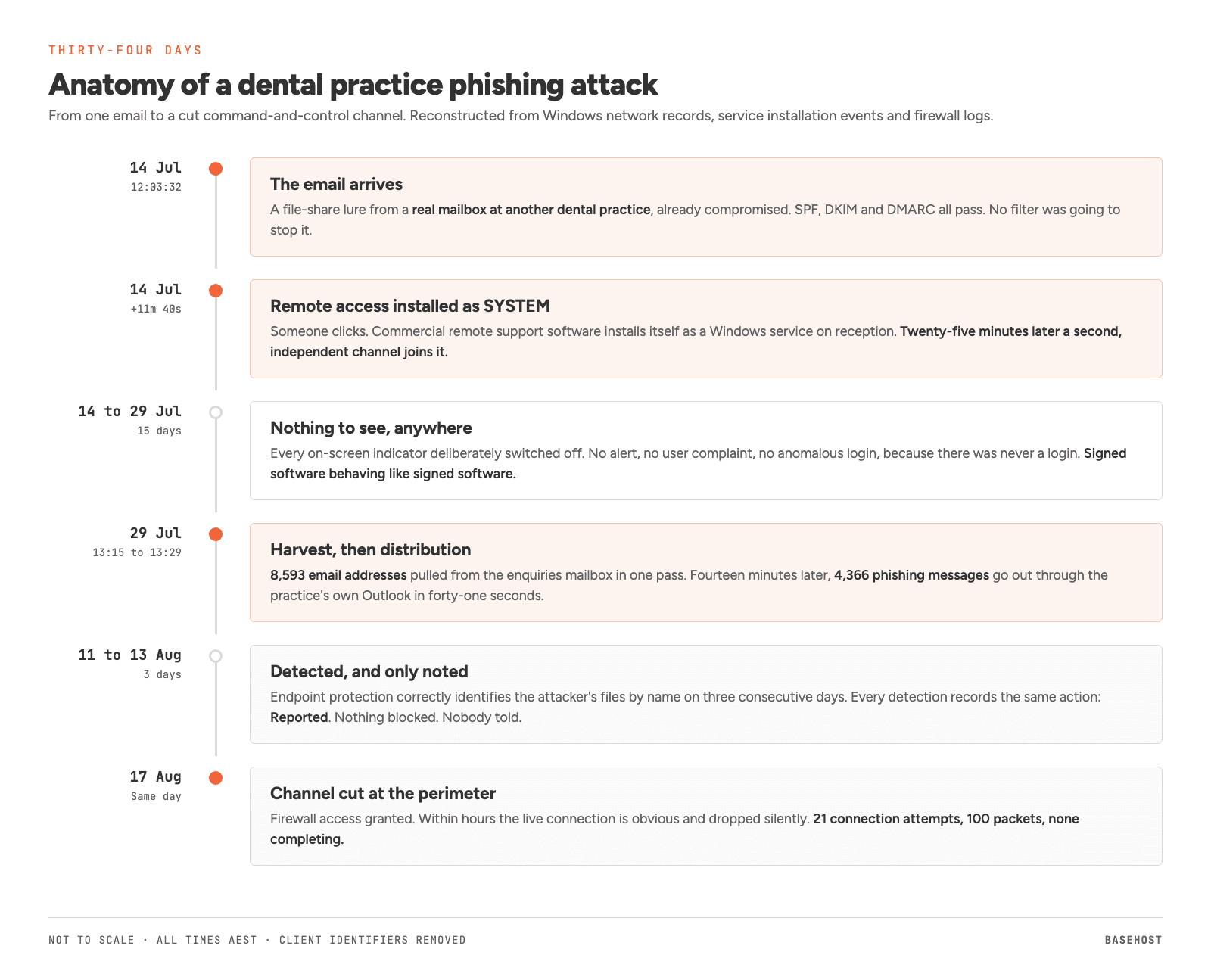
At 12:03:32 on a Tuesday in July, an email arrived at a Melbourne dental practice. It came from another dental practice they knew, from a real mailbox, and it passed every authentication check Microsoft applies. Eleven minutes and forty seconds later, commercial remote access software was running as SYSTEM on the reception computer. Twenty-five minutes after that, a second, independent remote access channel was running alongside it.
The practice noticed nothing for thirty-four days.
This is a deep dive into a single dental practice phishing attack we investigated, so it runs a good deal longer than our usual articles. Part one is written for practice owners and managers and takes about 16 minutes. Part two is the full forensic account for IT people and runs about 26 more.
Why we have published this. This playbook is being run against practice after practice, and almost nobody writes down what it actually looked like on the machine. The exact artefacts are the useful part: the domains, the file hashes, the remote access instance identifiers, the registry keys, the timings. Detection tooling is good and AI assistants are getting better at triage, but both can only recognise what somebody has already described somewhere. Published, these details let another provider hunt for the same operator across their own clients tonight. Kept private, they protect nobody. That is why the indicators section at the end is deliberately complete, and why the technical detail throughout is exact.
How we have handled the client’s details. We have published this with the client’s agreement. They have asked not to be named, and every identifier belonging to them or to any other practice involved has been removed. Everything else is exactly as we found it, because the detail is the point. This attack works precisely because each individual step looks unremarkable.
Part one: for practice owners and managers
If you run or manage a practice, this part is written for you and it is the whole of what you need. There is no technical knowledge assumed anywhere in it. Part two is the full forensic account for IT people, and you can skip it without missing anything that affects you.
What this cost the practice, in plain terms
No money was stolen. No ransomware was deployed. Nothing was encrypted and nothing stopped working, which is exactly why nobody noticed for thirty-four days.
What happened instead is that 4,366 people received an email that appeared to come from this practice and was designed to compromise them in turn.
About half of them were patients and members of the public, on personal addresses like Gmail, Hotmail, Outlook and Bigpond. The rest were other dental practices, laboratories, suppliers, referrers and the professional contacts the practice deals with every week. In other words, the people who received it were roughly everybody the practice had ever emailed.
The practice spent the following weeks answering calls from patients asking whether they had been hacked, and from colleagues asking the same thing less politely. Every relationship that email touched had to be repaired by hand, one conversation at a time.
Separately, and more seriously in regulatory terms, a file containing 8,593 email addresses drawn from the practice’s enquiries mailbox was created, saved, and left sitting on a reception computer in plain text for nineteen days. Around 5,761 of those strings plausibly identify a person. An email address is personal information under the Privacy Act, a dental practice is a health service provider regardless of turnover, and that combination put the practice into a formal thirty-day assessment under the Notifiable Data Breaches scheme.
The bill for an incident like this is not the ransom. It is the legal advice, the forensic investigation, the remediation, the notification, and the weeks of your practice manager’s attention.
What the law actually requires of a practice like this
Most Australian businesses turning over less than three million dollars a year sit outside the Privacy Act entirely. Health service providers do not, at any turnover, and a dental practice is a health service provider. Patient health information is also sensitive information under the Act, the category that carries the strictest handling obligations. A two chair practice and a thirty chair group carry the same duties here.
Three separate obligations applied to this practice at once, and they are worth pulling apart because they run on different triggers.
The Notifiable Data Breaches scheme. Once there are reasonable grounds to suspect an eligible data breach, you have to run a reasonable and expeditious assessment, taking all reasonable steps to complete it within thirty calendar days of becoming aware of the grounds for that suspicion. The OAIC is explicit that thirty days is a maximum rather than a target, because the risk to people usually grows with time. If the assessment lands on reasonable grounds to believe an eligible data breach has occurred, meaning unauthorised access, disclosure or loss of personal information that is likely to result in serious harm and that remedial action has not headed off, you notify the Commissioner and the affected individuals as soon as practicable. Serious harm is not limited to money: it expressly covers physical, psychological, emotional and reputational harm.
My Health Record, if you are connected to it. This one catches practices out. Every data breach involving the My Health Record system must be reported to the Australian Digital Health Agency as well as the OAIC, and that obligation does not wait on a serious harm test. Work out which of your systems touch it before you need the answer in a hurry.
State health records law. The Commonwealth Act is not the only one. In Victoria, the Health Records Act 2001 sits alongside it and gives patients a legally enforceable right of access to health information held about them in Victoria, under its own Health Privacy Principles. New South Wales and the ACT have their own equivalents. Practices operating across state lines are meeting more than one set.
Sitting on top of all of that is the professional layer, which is separate again from privacy law. The Dental Board of Australia’s codes and guidelines require practitioners to keep and protect patient records, and the ADA publishes practice level guidance on top, including Policy Statement 5.17 on dental records and member resources on data privacy and information management that include a data breach response plan template. If your practice has no written breach response plan, that template is the shortest path to one, and the worst time to start writing it is the afternoon you need it.
For this practice, the harvest file is what triggered the assessment: 8,593 email addresses, around 5,761 of which plausibly identify an individual, roughly half of them patients. The law is rarely the hard part of an incident like this. The hard part is answering what the assessment asks. This practice could show that no bulk copy of the patient records had happened, because the traffic volumes ruled it out. It could not show whether individual patient files had been opened, because nothing was recording that. Question seven below is exactly that gap, and it is a great deal cheaper to close before you need the answer than after.
This is a plain reading of where the obligations sit, not legal advice. If this happens to you, get your own.
Who we were, and were not, to this practice
BaseHost was not this practice’s security provider, and we want to be exact about that rather than vague.
Our engagement was reactive support. Helpdesk when something broke, keeping Windows and applications patched, watching whether machines were healthy and online, and supplying their Microsoft 365 licensing. That is the whole of it. No security controls, no watching of security alerts, no compliance work, no firewall, no policy settings, and no access to the systems where any of that lived.
The two things that failed here were the security software on the computers and the firewall between the practice and the internet. Both were installed and looked after by the practice’s other IT provider, as were the computers themselves, including the settings that let the attacker’s software install in the first place. We had no way to see into either of those systems until 17 August.
That is worth sitting with for a moment, because it is the real lesson of this incident and it has nothing to do with us. This practice had two IT relationships, and security was a named deliverable in neither of them. Everybody did the job they were engaged to do. Nobody was engaged to do this one. That gap is extremely common in small practices, and it is where this whole incident lives.
It also explains the timeline. We identified the phishing campaign within hours of it being sent, on the day it was sent. What took nineteen more days was proving the computers that sent it were still under someone else’s control, and we could not see that from where we were standing. The day we were finally given access to the firewall is the day the channel was cut. Those two facts belong together.
We investigated it anyway, and we have set out everything that failed further down without attributing any of it to anyone. Each one is ordinary. We would rather practices recognise these conditions in their own environment than work out whose fault they were in this one.
Nine questions for whoever looks after your computers
You do not need to be technical to work out whether your practice is exposed to this. Nine questions, each tied to something that made this incident possible, each with a way to get a rough answer yourself first so you know whether the reply sounds right. Ask by email, so you have the answers in writing.
Who you ask depends on where you sit, and in our experience practices fall into three groups.
You have an ongoing IT provider. Send them the nine questions. Getting clear answers is what you pay for.
Someone set it up once, years ago. Perhaps a relative, a contractor, or a staff member who has since left. They are not accountable for how the practice runs today, and it is unlikely they would want to be. Treat the answers you get as a snapshot of how things were on the day they finished, not how they are now.
Nobody looks after it. Then you have already answered the most important question, and the rest of this section will tell you what that costs. There is a short note at the end for you.
-
Can our staff install software on their own computers?
How to checkTry installing something on your own machine, or watch someone do it. If a program installs without anyone being asked for a password, then whoever is sitting there has full control of that computer, and so does anything they accidentally run.
What happened in this incident
This is the one to fix first. It is how the attacker’s software installed itself in under twelve minutes, and it is why we could not simply remove it from the machine afterwards. The operator could have put it straight back.
-
When our security software spots something, does it stop it or just make a note?
How to checkAsk to be shown the last five things it caught, and what happened to each one. If the answers are along the lines of “reported” or “detected”, it is keeping a diary. If they say “blocked”, “removed” or “stopped”, it is standing guard. Those are very different things and they cost the same.
What happened in this incident
In this incident the software correctly identified the attacker’s files on three days running. All three were noted. None was blocked. Nobody was told.
-
Who actually reads the security alerts, and what happens at 9pm on a Saturday?
How to checkAsk for the name of the person who was told about the most recent alert, and what time it reached them.
What happened in this incident
If nobody can name a person, the alerts are going nowhere. An alert nobody reads is not protection, it is a record of the thing you did not prevent.
-
What software is installed on our computers that lets somebody control them from outside the practice, and when did anyone last check?
How to checkYou cannot, and that is exactly the point. Looking at these computers would have shown you nothing, because every visible sign that someone was watching had been switched off on purpose. Ask to see the list instead, and ask when it was last put together.
What happened in this incident
A regular check that compares what is installed against what is meant to be there is a small piece of work. The one we ran on this practice found two of the attacker’s programs and a forgotten support tool that had been sitting on a machine since 2023, quietly able to connect in.
-
Can our computers connect to anything on the internet, or only what we need?
How to checkOn a practice computer, try visiting a few websites that have nothing to do with running a dental practice. If they all load, the practice’s connection is wide open in both directions.
What happened in this incident
The attacker’s software phoned home for thirty-four days on an unusual connection nobody had reason to allow. Nothing stopped it and nothing flagged it.
-
Does our email mark messages that come from outside the practice?
How to checkOpen an email from a supplier or a patient. Is there a small tag near the top saying something like External? If there is not, the setting is off.
What happened in this incident
The message that started this looked exactly like a genuine email from a practice they dealt with regularly, because it genuinely came from that practice’s real mailbox. A visible External tag will not stop a message, but it interrupts the assumption that makes people click.
-
If I asked which patient files were opened last Tuesday, could anyone tell me?
How to checkJust ask the question and listen to the answer. Hesitation is the answer.
What happened in this incident
We could rule out anyone copying the patient records in bulk. We could not rule out individual files being opened and read, and we never will be able to, because the record that would have answered it was never being kept. That gap is the difference between telling your lawyer what happened and telling them what you assume happened.
-
Does every computer in the practice reach every patient file?
How to checkSit at the reception computer and open the folders where patient documents and scans are kept. Can you see all of them?
What happened in this incident
If reception can see everything, then anyone who takes over the reception computer can see everything. A computer at the front desk should not reach the same material as the one in the surgery.
-
Is anything on our computers wiping their own history to make them run faster?
How to checkLook through the installed programs for anything advertised as a PC cleaner, tune-up or speed-up tool.
What happened in this incident
Software like this deletes the record Windows keeps of what has run on the machine. That is fine on a home laptop. On a computer holding patient information it means that after an incident, some questions can never be answered. In this case it removed the evidence of the first few minutes. We got there another way, and we were lucky.
A provider who answers all nine plainly is doing their job, and you will know where you stand. A provider who is defensive about being asked has told you something too.
If there was nobody to ask
This is the situation for a lot of small practices, and it is worth being straight about what it means rather than selling at you.
Look back at the nine. Not one of them is a product you buy once. Every one is a setting that someone has to own, and keep owning, because environments drift. Staff join and leave. A new computer arrives and gets set up quickly on a busy day. A licence changes and a feature quietly turns off. A policy that was right in 2022 is wrong by 2026 and nothing announces it.
The uncomfortable part of this incident is that the practice was not defenceless. Security software was installed on the computers and it worked: it correctly picked out the attacker’s files on three days running. A firewall was in place. A Windows feature that protects saved passwords was switched on, and it held. The tools were there, and several of them did their job.
What was missing was somebody whose actual job was to look at what those tools were saying. The warnings went into a screen that nobody opened. Six days later we found the machines still under someone else’s control, and we found them while looking into something else.
That is the case for ongoing support, and it is not really a case about software. It is that security is not a thing you install, it is a thing somebody watches. If nobody in your practice has that as part of their week, then whatever you have bought is doing less than you think it is.
If you are in that position and you would like a straight answer about where you stand, we will run through the nine questions with you and tell you what we find. If the answer is that you are in reasonable shape, we will say that too.
Common questions about this dental practice phishing attack
Six questions we are asked most often about this incident. Select one to read the answer.
Which dental practice was this?
We are not naming them. The practice agreed to this article being published on the condition that they and every other practice involved stay anonymous, and every identifying detail has been removed. The technical detail is exact.
How did the attackers get in?
Through a single phishing email that impersonated a file-share invitation from another dental practice. It was not a fake sender. It came from that practice’s real mailbox, because that practice had already been compromised the same way. Someone opened the link, and remote access software installed itself eleven minutes and forty seconds after the email was delivered.
Was patient information stolen?
A file of 8,593 email addresses was taken from the practice’s enquiries mailbox, of which around 5,761 plausibly identify a person, roughly half of them patients on personal email accounts. The file contained addresses only: no names, no dates of birth and no clinical information. Whether individual patient documents were separately opened could not be determined, because the drives holding them were not keeping a record of who opened what. Under Australian privacy law an email address is personal information, and a dental practice is a health service provider regardless of its size or turnover, so this triggered a formal assessment under the Notifiable Data Breaches scheme.
Could this happen to my practice?
If your staff can install software on their own computers, if nobody has a current list of what remote access tools are installed, and if nobody reads your security alerts, then yes, and there is very little standing in the way. Those three conditions are what made this possible. The nine questions above will tell you where you stand in about twenty minutes.
I think we received an email like this. What should I do?
Do not click the link, and do not forward the message to colleagues to warn them, because forwarding it spreads the live link. Ring the practice it appears to come from, on a number you already have rather than the one in the email, and tell them. If anyone in your practice has already clicked it, treat the computer they clicked it on as compromised and get it looked at properly rather than just running a virus scan. Incidents can be reported to the Australian Cyber Security Centre. The software used here is not a virus and will not be found by scanning for one.
Was this ransomware?
No, and that is the point worth taking away. Nothing was encrypted, nothing stopped working and no money was demanded. The practice kept running normally throughout, which is exactly why thirty-four days passed without anybody noticing. Not every serious incident announces itself.
Part two: the technical account
Everything below is the forensic detail: the message and its headers, what was installed and how it was hidden, the evidence we reconstructed the timeline from, how the channel was cut, and the indicators. It also includes one mistake we made during containment, because the lesson in it is more useful than the embarrassment is costly.
The message
The lure was a file-share notification. A folder icon, an Open button, a Share button, and two sentences of body text:
“I’m trying to get more organized in making our data for different things more shared/visible. For Security reasons, please view the file on your desktop or windows laptop.”
Below it sat the sending practice’s complete signature block: street address, phone number, website. All genuine, because the practice was genuine.
The second sentence is the one worth pausing on. There is no security reason to prefer a desktop over a phone. There is an operational one. What sits behind that link only runs on Windows, and a receptionist reading email on a phone is a wasted click. The instruction exists to move the reader onto a machine where the payload will execute. We have seen this phrasing enough now to treat it as a signature in its own right.
The message was addressed to the sender’s own display name, with the real recipients in BCC. That is a mass send dressed as a personal note.
Why nothing stopped it
This is the part most defenders get wrong when they read a story like this, so it is worth being blunt: no mail filter was going to catch this message.
The headers tell you why:
Authentication-Results: spf=pass dkim=pass dmarc=pass compauth=pass reason=100
SPF passed. DKIM passed, signed by the sending provider. DMARC passed. Microsoft’s composite authentication passed with the highest confidence score it issues. The message was not spoofed, and no amount of anti-spoofing configuration would have helped, because the sender really was the sender. Someone had the account’s credentials and used them.
Exchange Online Protection classified the message SCL:1, SFV:NSPM, CAT:NONE. Not spam. The sending network’s own outbound filter scored it 1.5 out of a possible 15 and took no action. Both were correct on the information available to them. The message carried no attachment, no malicious code, and a single link to a domain with no reputation history because it had been registered for this purpose.
We also found this in the recipient tenant’s headers:
X-MS-Exchange-ExternalInOutlookResult: NotEnabled
External sender identification was switched off. That is the Microsoft 365 setting which tags mail arriving from outside your organisation. It would not have blocked anything, but it would have put a visible External marker on a message impersonating a practice the reader corresponded with regularly. It is one command, it costs nothing, and it was not on. If you read one paragraph of this article and act on it, make it this one.
The delivery path told us something else. The sending machine announced itself to the relay with a HELO name matching a front-desk workstation, over a consumer NBN connection, using authenticated submission from a desktop Outlook client. The upstream practice was not spoofed and was not a spam relay. Someone was sitting at their reception computer, in their Outlook, sending as them.
That matters because it is exactly what happened here nineteen days later.
What was installed
Twelve minutes after delivery, Windows service installation records begin.
14 Jul  12:15:12   Reception 2   ScreenConnect Client (359e34a1133b6cee)
14 Jul  12:17:42   Reception 1   ScreenConnect Client (359e34a1133b6cee)
14 Jul  12:40:30   Reception 2   ScreenConnect Client (19e702d7c59aaac2)
14 Jul  12:42:06   Reception 1   ScreenConnect Client (19e702d7c59aaac2)

all four: Service Account LocalSystem, Start Type auto start
Two things stand out. The first is speed: two and a half minutes to move from the machine that clicked to the second reception machine. The second is redundancy. Those are two entirely separate ConnectWise ScreenConnect deployments, on different servers, on different ports, in different hosting networks, built from software releases fourteen months apart. This is not one operator installing twice. It is an operator with access to two independent remote support tenancies, establishing a backup channel from the outset, twenty-five minutes into the intrusion.
ScreenConnect is legitimate commercial remote support software, and abusing it is catalogued by MITRE as T1219, Remote Access Software. Thousands of Australian MSPs run it, including for entirely proper reasons. That is the appeal: the binaries are signed by the vendor, the traffic looks like remote support traffic, and no endpoint protection product should be expected to block it.
Both clients installed as Windows services running as LocalSystem with automatic start, and both registered components into two places that matter:
HKLM\SYSTEM\CurrentControlSet\Control\Lsa
    Authentication Packages

HKLM\SOFTWARE\Microsoft\Windows\CurrentVersion\Authentication\Credential Providers
An authentication package DLL loads into LSASS at boot. A credential provider appears at the logon screen. Neither is required for remote support. Both are useful if you want to survive a reboot and observe credentials being entered.
The file that shows intent
The live channel carried a configuration file the other did not. It contained twelve settings, and nothing else:
| Setting | Value | Effect |
|---|---|---|
AccessShowUnderControlBanner |
false | No on-screen banner |
AccessShowSystemTrayIcon |
false | No tray icon |
AccessShowBalloonOnConnect |
false | No alert when someone connects |
AccessShowBalloonOnHide |
false | No alert when they leave |
AccessHideWallpaperOnConnect |
false | No visual change at session start |
SupportShowUnderControlBanner |
false | As above, support mode |
SupportShowSystemTrayIcon |
false | As above |
SupportShowBalloonOnHide |
false | As above |
SupportHideWallpaperOnConnect |
false | As above |
ShowSystemTrayIcon |
false | Global suppression |
ShowCloseDialogOnExit |
false | No dialog on exit |
ShowFeedbackSurveyForm |
false | No post-session prompt |
Every entry suppresses a signal. The manufacturer ships all of them enabled by default, precisely so that a person at the keyboard knows when their machine is being watched. Settings of this kind are applied on the operator’s own server before the client package is built, which means the file records a decision made in advance rather than a state a machine could drift into.
With the banner, the tray icon, the notifications and the wallpaper change all suppressed, one tell remained: the mouse pointer moving on its own. A utility named HideMouse.exe was deployed to conceal exactly that, on 22 July, on 23 July, and again on 29 July at around 12:56, twenty-two minutes before the harvesting tool ran.
We are careful about the word intent, because it is a legal conclusion and we are not lawyers. What we will say is that this configuration is not a plausible accident, and the sequence of tools deployed to close the remaining gaps is not a plausible accident either.
Thirty-four days, and what was visible in each of them
Between 14 July and 17 August the operator had the same access as a person sitting at the reception desk. That number is the attacker’s access window, not a response window, and it matters to separate the two. It divides into three periods that look nothing like each other.
14 to 29 July. Nothing to see, anywhere. Fifteen days in which the software sat on both machines, connected out, and produced no signal at all. No product raised an alert, because none of them considered signed remote support software to be a threat. Nothing appeared on screen, because every visible indicator had been deliberately switched off. There was no mail to be suspicious of and no user complaint. In this period the only things that surface an intrusion like this are controls that look for the software’s presence rather than its behaviour: an inventory of what remote access tools are installed on each machine, or a rule that alerts when unsigned programs run from a user’s own folders. Neither was in place, and neither was in anybody’s scope.
29 July. The one visible day. The campaign went out at 13:29 and was identified within hours, by the practice and independently by us, because we received one of the messages ourselves. The mailbox was secured, sessions were revoked and the recipient list was produced the same afternoon.
29 July to 17 August. The evidence existed, in places nobody was looking. The remote access continued. From 11 August, the security software on the computers began correctly identifying the attacker’s files by name on three consecutive days, and recorded each one without blocking it and without telling anybody. That record went into a screen that was not being read. Meanwhile the investigation was on the mailbox, because a mass send from a mailbox is what the visible evidence pointed at, and nothing in the Microsoft 365 record suggested a workstation was involved: there was no unauthorised login, because there had never been a login. What changed on 17 August was not effort. It was access. Within hours of being able to see the firewall and the detection records, the live connection was obvious, and it was cut the same day.
The rest of this article is how that reconstruction was done after the fact. Windows keeps per-application network records for roughly sixty days, and both machines still had theirs intact.
The second channel died early. Its daily volume falls from 400,690 bytes on 21 July to 18,444 the next day, and from 23 July it sits at a flat 1,262 bytes sent and 240 received every hour on both machines, unchanged for twenty-six days. That is the signature of a connection retrying and failing, not an established session. Its server simply stopped answering. The primary channel carried on.
After the main event on 29 July, there were four further sessions, all outside opening hours:
| Date | Hour ending | Bytes sent |
|---|---|---|
| Thu 30 Jul | 19:09 | 200,906 |
| Fri 31 Jul | 07:21 | 433,557 |
| Wed 5 Aug | 06:43 | 696,647 |
| Thu 6 Aug | 07:50 | 178,800 |
Against an idle baseline near 25,000 bytes an hour. Someone came back four times to check on a foothold they had already used.
On 11, 12 and 13 August, the practice’s endpoint protection identified the attacker’s configuration files by name. Every detection across the estate in the review period carries the same action:
Action taken: Reported
Nothing blocked, nothing quarantined, no alert that reached anyone who would act on it. The detections were real and correct. The policy was in report-only mode. Six days of avoidable exposure sat between that first detection and the day the machines were finally examined.
Fourteen minutes
The events of 29 July are established to the second from four independent sources: file metadata, the Windows registry save-dialog history, per-application network records, and the Microsoft 365 audit log.
12:56       HideMouse.exe deployed. Detected by endpoint protection. No action taken.
13:15:36    leno.txt written: 8,593 unique strings extracted from the enquiries mailbox
13:15:37    First campaign message lands, carrying https://file.oventra.vu/
13:16:17    Operator saves the file through a standard Windows save dialog
13:18       Harvesting tool records network activity; interactive session confirmed
13:23-13:26 Individual sends continue on the same landing domain
13:28       Landing domain rotated to https://file.docsecdental.vu/
13:29:11    Distribution begins
13:29:52    Distribution complete. 4,366 messages. Forty-one seconds.
14:00-15:00 42,076,025 bytes on the remote channel, the heaviest hour of the intrusion
The harvesting tool was TechnoCom Email Extractor Outlook 4.8.1.15, an unsigned commercial marketing product that anyone can buy. It works by driving Outlook through its own automation interface rather than reading mailbox files, which is why it needed no password and left no trace in Microsoft 365. It was delivered onto the machine over the remote access channel, not downloaded by a member of staff.
Note the domain rotation at 13:28. The operator switched landing pages three minutes into the distribution and one minute before the bulk send. That is not carelessness. That is someone with a pool of registered domains, cycling through them to stay ahead of blocklists.
The outbound messages went out through the practice’s own Outlook, from the practice’s own internet connection, on a session a staff member had already signed into. From Microsoft’s point of view there was no anomalous login, because there was no login. Every detection rule built on the assumption that compromise begins with an authentication event had nothing to fire on.
Which is exactly how the practice was compromised in the first place, nineteen days earlier, by another practice in the same position.
What was actually taken
We recovered the harvest file intact from the user’s Documents folder, where it had sat in clear text for nineteen days. That turned the data question from an estimate into a count.
The file contained 8,593 unique strings. Classified under a fixed rule set applied in order:
| Category | Count | Share |
|---|---|---|
| Consumer mailbox providers | 4,361 | 50.8% |
| Organisation domains, individual-style addresses | 1,400 | 16.3% |
| Organisation domains, role or shared addresses | 648 | 7.5% |
| The practice’s own mailboxes | 6 | 0.1% |
| Machine-generated identifiers, not people | 2,178 | 25.3% |
A quarter of the file is not people at all. It is message identifiers, DKIM and return-path tokens and bulk-mail sender addresses, because the tool sweeps the full text of every message including headers rather than reading the sender and recipient fields. Of the 215 strings carrying the practice’s own domain, 209 were machine artefacts rather than mailboxes.
That leaves 5,761 strings that plausibly identify an individual, against 4,366 who were actually sent the phishing message. The gap is the number that matters for a privacy assessment: roughly 1,395 people whose contact details were collected but who never received an email, and who therefore do not appear anywhere in a mail trace. An assessment built only on the recipient list would have missed them entirely.
If you take one investigative lesson from this article, take that one. The mail trace tells you who was mailed. It does not tell you what was taken.
How we found it
The practice contacted us the same afternoon as the distribution, at the same time as we received one of the messages ourselves. What took until 17 August was not identifying the phishing campaign. It was establishing that the machines which sent it were still under external control.
The artefacts that carried the investigation, in rough order of value:
Windows network usage records (SRUM). The single most useful source. C:\Windows\System32\sru\SRUDB.dat holds roughly sixty days of per-application network volume, bucketed hourly, and it survives most cleanup. It gave us the installation date, every session window, the four return visits, the moment the second channel died, and the exact hour of the harvest. The database is locked while Windows is running, so take it with a forensic copy rather than copy, along with the SOFTWARE hive it needs for interface resolution, then parse it offline:
SrumECmd.exe -f .\SRUDB.dat -r .\SOFTWARE --csv .\out
If you take nothing else operational from this article: collect SRUM before you rebuild anything. A rebuild destroys it, and it is the only place the sixty-day picture exists.
Windows event log, ID 7045. Service installation records, complete with the full command line. That is where the instance identifiers, server addresses, ports and session identifiers came from:
Get-WinEvent -FilterHashtable @{ LogName = 'System'; Id = 7045 } |
    Select-Object TimeCreated,
                  @{n='Service';   e={ $_.Properties[0].Value }},
                  @{n='ImagePath'; e={ $_.Properties[1].Value }},
                  @{n='StartType'; e={ $_.Properties[3].Value }},
                  @{n='Account';   e={ $_.Properties[4].Value }} |
    Sort-Object TimeCreated
Anything installing as LocalSystem with auto start that you did not deploy is the whole investigation in one row.
The registry save-dialog history. ComDlg32\OpenSavePidlMRU under HKCU\Software\Microsoft\Windows\CurrentVersion\Explorer\ recorded the harvest filename and the time it was saved, which is how we knew what to look for and where. The key’s own last-write timestamp dated the action. The values are binary shell item lists rather than plain paths, so you need a parser such as RECmd or Registry Explorer to read them; reg query will show you that entries exist but not what they say.
The firewall. Generated outside the compromised machines and unalterable from them, which makes it the strongest evidence in the matter. It is the only source that proves, rather than infers, that unauthorised access was still live on the day we cut it.
The recovered file itself, preserved and hashed before anything was changed.
We also found the click, indirectly. Microsoft Edge was not the staff browser on these machines; Chrome was, by two orders of magnitude. Edge was simply the default protocol handler, which is what opens when you click a link in Outlook. In the two hours spanning the installation, Edge received 49.4 MB and 33.3 MB on one machine, against a median of 74 KB per hour across the entire sixty-day record. Those two hours are the first and third largest Edge hours in the whole window.
One thing we could not recover. A disk cleaning utility, installed on the practice’s previous provider’s advice and run knowingly to keep the machines fast, had cleared the Windows prefetch store on three consecutive days in August. Windows execution history for 14 July was gone before anyone looked. We were fortunate that the vector survived in the mailbox instead.
If you run a utility that clears execution history on machines that hold client or patient data, you are choosing performance over the ability to ever answer what happened. That is a legitimate trade, but it should be a decision rather than a default.
Cutting the channel
Both machines granted local administrator rights to the shared reception login. That is the detail which shaped the entire containment plan. Any control placed on the machine itself could have been reverted by an operator holding an active session, and an operator watching the screen would have seen it happen.
So we did not touch the endpoints. We went to the perimeter, added two rules above the existing permissive outbound rule, and set them to drop silently rather than reject, so that from the operator’s side the connection simply stopped completing rather than being actively refused.
The firewall log then did something we do not often get in an incident: it proved the containment.
13:37:37   first denied packet
14:01:38   last packet in the first window
           100 denied packets, 21 distinct connection attempts by source port
           retransmission offsets 0, 1, 3, 7, 15 seconds. No progression past SYN.
18:45:07   last denied connection attempt
Twenty-one attempts, one hundred packets, none completing, and the retry backoff pattern of a client that is getting no answer at all. Their console would have shown both machines drop offline within seconds of each other.
The mistake worth publishing
The first rule set blocked the live server by address, and the second channel by domain name. That was insufficient, and we want to be explicit about why.
The second client had cached its server’s numeric address in its own configuration file weeks earlier and was connecting directly to the IP. A domain-based block can never match a client that has stopped doing DNS lookups. That path stayed open for about five hours until we recovered the cached address from the client’s user.config and blocked the address itself.
Nothing traversed it, and we can show that: the client’s volume was pinned at the same 1,262 bytes an hour it had been sending since 21 July. But the exposure was real, and the lesson is general. Where a hostname is known to have resolved to an address, block the address as well, and read the client’s own configuration for cached lookups before you call a channel closed.
Removal, and the order that matters
Removal was performed manually rather than through the product uninstaller, in a specific sequence built around the components loaded into the Windows authentication process. Instance identifiers below are the ones from this incident; substitute your own.
-
Deregister the LSA authentication packages first, then reboot and verify. Read the current value before you touch it, because it is a
REG_MULTI_SZand you are editing a list, not replacing a string:reg query "HKLM\SYSTEM\CurrentControlSet\Control\Lsa" /v "Authentication Packages"On a clean machine that returns
msv1_0and nothing else. Remove the attacker’s entry and leave the rest intact. If you delete the program directories first, you leave LSASS trying to load DLLs that no longer exist at every boot. That is a bad afternoon. -
Stop and delete the services, terminate processes, remove program directories. The service name is the instance identifier, so it is predictable once you have it from the 7045 event:
sc.exe stop   "ScreenConnect Client (359e34a1133b6cee)"

sc.exe delete "ScreenConnect Client (359e34a1133b6cee)"
powershell
Get-Process | Where-Object Path -like '*ScreenConnect*' | Stop-Process -Force
Remove-Item 'C:\Program Files (x86)\ScreenConnect Client (*)' -Recurse -Force -
Deregister the two logon-screen credential providers, by CLSID, under:
HKLM\SOFTWARE\Microsoft\Windows\CurrentVersion\Authentication\Credential Providers\Export the key before deleting anything. Removing the wrong provider is how you get a machine that will not accept a logon.
-
Clear residual registry entries, including the service keys left under
HKLM\SYSTEM\CurrentControlSet\Services\. -
Remove runtime data from the system profile, which is where a copy of the client configuration survives an otherwise clean removal, and where we recovered the cached server address:
C:\Windows\SysWOW64\config\systemprofile\AppData\Local\ScreenConnect Client (*)\user.config -
Reboot and verify: no services, no files, no processes, no registry entries, authentication packages back to the Windows default, clean startup.
powershell

Get-Service | Where-Object Name -like '*ScreenConnect*'

Get-Item 'C:\Program Files (x86)\ScreenConnect Client (*)' -EA SilentlyContinue

(Get-ItemProperty 'HKLM:\SYSTEM\CurrentControlSet\Control\Lsa').'Authentication Packages'
All three should come back empty, empty, and
msv1_0.
One genuinely good piece of news came out of the credential assessment. Both machines had Windows LSA Protection and Credential Guard active, with RunAsPPL and RunAsPPLBoot set and the isolated LSA process running. The attacker’s authentication package DLLs were registered, but on that configuration Windows would have refused to load them at every startup. Domain credential exposure was assessed as low as a result. You can check the same thing on your own fleet in one line:
Get-ItemProperty 'HKLM:\SYSTEM\CurrentControlSet\Control\Lsa' |
    Select-Object RunAsPPL, RunAsPPLBoot
Get-CimInstance -ClassName Win32_DeviceGuard -Namespace root\Microsoft\Windows\DeviceGuard |
    Select-Object SecurityServicesConfigured, SecurityServicesRunning
A 1 in SecurityServicesRunning is Credential Guard actually running, as opposed to merely configured. The two are not the same thing and the difference only shows up when you need it.
That does not remove the need for rotation. An operator with system-level control and interactive access for thirty-four days can still reach browser-stored passwords, credentials sitting in files, application logins and the wireless key, none of which those mechanisms protect.
What would actually have stopped this
Eight conditions made this possible. None of them is exotic, and all of them are fixable. Everything below is written for the Microsoft-native stack, because that is what this environment ran. The equivalents exist in every other stack, and the question you are asking of your own tooling is the same one either way.
Detections in report-only mode. The attacker’s files were identified on 11 August and nothing happened. Report-only is a deployment stage, not a destination, and estates get left in it. Find out what yours is actually doing before you assume:
# 0 = Disabled, 1 = Block, 2 = Audit, 6 = Warn
$p = Get-MpPreference
for ($i = 0; $i -lt $p.AttackSurfaceReductionRules_Ids.Count; $i++) {
    [pscustomobject]@{
        Rule   = $p.AttackSurfaceReductionRules_Ids[$i]
        Action = $p.AttackSurfaceReductionRules_Actions[$i]
    }
}

# Tamper protection stops a local admin, or an operator holding one, turning it all off
Get-MpComputerStatus | Select-Object IsTamperProtected, AMRunningMode, RealTimeProtectionEnabled
Anything sitting at 2 is writing a diary. Move it to 1, turn on tamper protection, and route the alerts to a mailbox or channel with a human name against it.
Local administrator rights on standard user accounts. This enabled the installation of system-level services and removed every endpoint-based containment option once compromise was known. It is the single highest-value change on this list.
Get-LocalGroupMember -Group 'Administrators'
Remove-LocalGroupMember -Group 'Administrators' -Member 'DOMAIN\reception'
Removing the rights is the easy half. The half that makes it stick is having a managed break-glass account so nobody needs to hand the old password back out: Windows LAPS, deployed from Intune under Endpoint security, Account protection, Local admin password solution, rotating a unique password per device.
No inventory of remote access software. Two attacker clients ran for thirty-four days on managed machines. The same review that found them also turned up an abandoned vendor support agent resident since March 2023. We said this was a short script, so here it is:
$known = 'ScreenConnect|ConnectWise|AnyDesk|TeamViewer|Splashtop|LogMeIn|GoToAssist|' +
         'SimpleHelp|RustDesk|Supremo|DWAgent|MeshAgent|Atera|Action1|NinjaRMM|Syncro|' +
         'Kaseya|BeyondTrust|RemotePC|Zoho Assist|UltraViewer|TightVNC|RealVNC'

Get-CimInstance Win32_Service |
    Where-Object { $_.Name -match $known -or $_.PathName -match $known } |
    Select-Object Name, State, StartMode, StartName, PathName

Get-ItemProperty 'HKLM:\SOFTWARE\Microsoft\Windows\CurrentVersion\Uninstall\*',
                 'HKLM:\SOFTWARE\WOW6432Node\Microsoft\Windows\CurrentVersion\Uninstall\*' -EA 0 |
    Where-Object DisplayName -match $known |
    Select-Object DisplayName, DisplayVersion, Publisher, InstallDate
Run it across the estate on a schedule, diff the output against an approved list, and alert on anything new. On day one here, that returns two ScreenConnect services running as LocalSystem that nobody ordered.
Unrestricted outbound network access. The perimeter permitted arbitrary outbound connections, including the uncommon port the live channel used. Default-deny outbound with logged denials is unglamorous and it works. To see what your own machines are actually talking to before you write the rules:
Get-NetTCPConnection -State Established |
    Where-Object RemoteAddress -notmatch '^(127\.|::1|10\.|192\.168\.|172\.(1[6-9]|2\d|3[01])\.)' |
    Select-Object RemoteAddress, RemotePort, OwningProcess,
                  @{n='Process'; e={ (Get-Process -Id $_.OwningProcess -EA 0).Path }} |
    Sort-Object RemotePort
Anything leaving on a port that is not 80 or 443 should have a name and a reason. In this incident the live channel sat on TCP/8041 for thirty-four days and nothing asked it to justify itself.
No alerting on unsigned executables in user folders. Neither tool used here was malware, so signature detection was never going to help. The harvesting tool was an unsigned commercial product running out of a user profile directory, which is a shape you can catch generically. The relevant attack surface reduction rule is Block executable files from running unless they meet a prevalence, age, or trusted list criterion:
# Start in audit, review what it would have blocked, then switch to Enabled
Add-MpPreference -AttackSurfaceReductionRules_Ids 01443614-cd74-433a-b99e-2ecdc07bfc25 `
                 -AttackSurfaceReductionRules_Actions AuditMode
That rule depends on cloud-delivered protection being on. While you are in there, the other three worth knowing by number are 9e6c4e1f-7d60-472f-ba1a-a39ef669e4b2 (block credential theft from LSASS, which Microsoft notes is redundant if you already run LSA Protection and Credential Guard, as this practice did), d1e49aac-8f56-4280-b9ba-993a6d77406c (block process creation from PsExec and WMI) and e6db77e5-3df2-4cf1-b95a-636979351e5b (block persistence through WMI event subscription).
For a point-in-time answer without deploying anything, signature status is one pipeline:
Get-ChildItem "$env:USERPROFILE\Downloads", "$env:USERPROFILE\Documents", "$env:TEMP" `
              -Include *.exe, *.dll, *.scr -Recurse -EA 0 |
    Get-AuthenticodeSignature |
    Where-Object Status -ne 'Valid' |
    Select-Object Status, Path
Anti-forensic software running by design. A disk cleaner cleared the prefetch store on three consecutive days in August and took the execution history for 14 July with it. Confirm prefetching is actually on, and keep it that way:
reg query "HKLM\SYSTEM\CurrentControlSet\Control\Session Manager\Memory Management\PrefetchParameters" /v EnablePrefetcher
3 means application and boot prefetching are both enabled, which is what you want on a machine holding patient data. Then block the cleaner category itself through AppLocker or App Control for Business rather than relying on nobody reinstalling it.
No auditing on the file shares holding patient documents. This is the reason the investigation cannot close the question of whether individual patient files were opened. Bulk transfer is excluded by volume analysis. Individual access is not, and never will be, because the log that would answer it was never being written. Two steps, on the file server:
auditpol /set /subcategory:"File System" /success:enable /failure:enable
$path = 'D:\Shares\PatientDocs'
$acl  = Get-Acl -Path $path -Audit
$rule = New-Object System.Security.AccessControl.FileSystemAuditRule(
            'Everyone', 'ReadData,WriteData,Delete',
            'ContainerInherit,ObjectInherit', 'None', 'Success')
$acl.AddAuditRule($rule)
Set-Acl -Path $path -AclObject $acl
That produces event ID 4663 on access. Be deliberate about scope, because auditing read access on a busy share is loud, and ship the events somewhere off the box. An audit log that only exists on the machine an attacker controls is not evidence.
Uniform data access from every workstation. Both reception machines carried drive mappings to the complete patient document and scan shares, so compromising a workstation carried access to the entire record set rather than the subset that room needs. Map by security group rather than by machine, and check what you have actually granted:
Get-SmbShare | Where-Object Name -notmatch '\$$' | ForEach-Object {
    Get-SmbShareAccess -Name $_.Name
}
External sender identification not enabled. One command, and here it is:
Connect-ExchangeOnline
Set-ExternalInOutlook -Enabled $true
Get-ExternalInOutlook          # confirm Enabled is True
Two things to know before you run it. It takes 24 to 48 hours to propagate to Outlook clients, so do not judge it the same afternoon. And if you already prepend something like [EXTERNAL] to subject lines with a mail flow rule, disable that rule first or your users get tagged twice and start ignoring both. Recipients you genuinely want exempted go in -AllowList, not in a carve-out to the whole feature.
Indicators
Published for defensive use. Add them to your blocklists and hunt for them in your own environments. The remote access channels are dead; the phishing infrastructure may not be.
Phishing landing pages. Three domains, all on the same top-level domain, all registered without reputation history, rotated between stages:
avernix.vu              initial access
file.oventra.vu         distribution, first wave
file.docsecdental.vu    distribution, second wave
Command and control:
relay.cojeqinvpt.online                    38.92.40.3       TCP/8041
instance-kkohov-relay.screenconnect.com    5.135.169.230    TCP/443
The second address no longer resolves by name and was recovered from the client’s cached HostToAddressMap. It appeared on no published advisory we reviewed.
ScreenConnect instance identifiers (the last 16 hex characters of the MD5 of the server’s RSA public key, so they identify the operator’s server rather than the victim):
359e34a1133b6cee    installed first, port 443, client build June 2026
19e702d7c59aaac2    installed second, port 8041, client build April 2025
Files (SHA-256):
797c30f83799eabc8cdb343b14c669e2d5fb9854597798cacc80dd3f1c137008
    Email Extractor Outlook.exe, TechnoCom v4.8.1.15, unsigned

610036c49c73babc0ef45e4089901983f6c68d3edea703b6b352ef7c917cc677
    app.config, the concealment settings above
Host paths worth hunting:
C:\Program Files (x86)\ScreenConnect Client (*)\
C:\Users\<user>\Documents\ScreenConnect\Files\
C:\Windows\SysWOW64\config\systemprofile\AppData\Local\ScreenConnect Client (*)\user.config
HKLM\SYSTEM\CurrentControlSet\Control\Lsa  ->  Authentication Packages
Session identifiers that would let the vendor attribute the operator’s account have been withheld from this article and provided directly to ConnectWise.
The part that should worry you
Read the two ends of this incident together.
The message that compromised this practice was sent from a reception workstation at another dental practice, through that practice’s own Outlook, using that practice’s own credentials, over that practice’s own internet connection, carrying that practice’s own signature block.
Nineteen days later, this practice played exactly the same role for 4,366 addresses, most of them other dental practices, laboratories and suppliers.
Each compromised practice becomes the sender for the next. Every message in the chain is authentication-clean, because it genuinely originates from a real peer. There is no spoofing to detect, no attachment to sandbox, no malware to signature, and no anomalous login to alert on. The chain is powered entirely by the fact that dental practices email each other constantly and trust each other’s email.
Mail filtering does not break this pattern. What breaks it is the boring stuff: users who cannot install services, an inventory that notices new remote access software, alerting on unsigned executables in user folders, and outbound traffic that has to justify itself.
The client configuration in this case was never changed in thirty-four days. Same server, same port, same keys, from installation to removal. The harvest output was left sitting in the Documents folder in plain text. That is not a bespoke operation against one practice. It is a repeatable playbook being run at volume, and on the evidence of the recipient lists, it is still running.
If you are a dental practice in Melbourne and you received an unexpected file-share invitation from a practice you know, particularly one asking you to open it on a desktop, we would like to hear about it.
About this investigation
BaseHost’s engagement with this practice was reactive support: helpdesk, remote patching, device health monitoring and Microsoft 365 licensing. Security and compliance were not in scope for us, and the endpoint protection console and the perimeter firewall belonged to a previous provider. We could not see what either of them was seeing until 17 August 2026, which is the single biggest reason the intrusion ran as long as it did.
We took the investigation on regardless, because the practice needed it done and needed it done properly. What that involved: identified the phishing distribution within hours of it being sent, established the full thirty-four day access window through host forensics after the fact, recovered the harvest file intact and counted precisely what was taken, cut the command-and-control channel at the perimeter on the day we were given access and proved it from a device the compromised machines could not influence, removed both remote access clients by hand in the correct order, and produced a post-incident review the practice’s legal adviser could act on inside the thirty-day Notifiable Data Breach assessment window.
The findings in this article were reconstructed from Windows network usage records, service installation events, registry save-dialog history, the recovered harvest file, firewall logs and the original phishing message with full internet headers. Every figure quoted has been verified against at least two independent sources.
If you would like an assessment of whether any of this applies to your environment, or you think you may be in the middle of something similar, our engineers are on 1300 621 888, answered twenty-four hours a day.
Managed IT, security and digital, under one roof.